How to Write for the Wincanton Window
- Write your story
- Get a photo to illustrate it (one without copyright, or with permission)
- Email it all to editor@wincantonwindow.co.uk
- Submit a calendar entry
Below:
How the site works
Editing
How to write an article
Boundaries and editorial policy
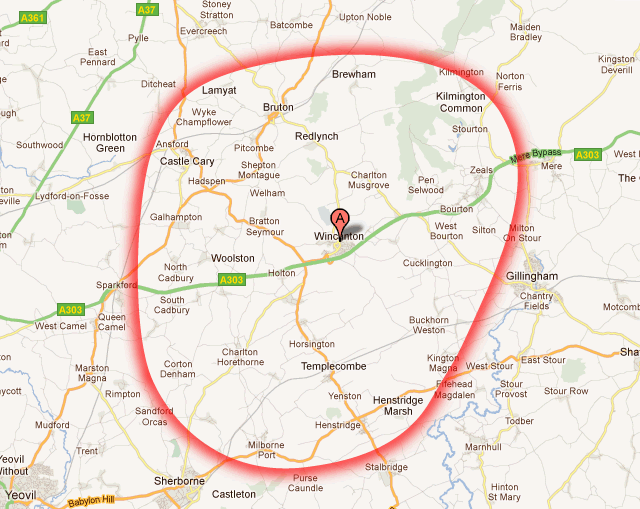
Catchment area
How the site works
If you're considering contributing an article to the Window it might help to familiarise yourself with how the site works.
Down the right hand side of every page is the list article categories, such as Sports. Click on those to reveal a further list of sub-categories, one for each sport or other related activity. Each category, or sub-category page shows summaries of the articles it contains.
The Headlines page is the home page, and shows summaries of the latest articles from all categories on the site.
Article summaries shown on the home and category pages are displayed in chronological order, from top left to bottom right. When a new article is published it will appear at the top of both the home page, as well as one or more category pages.
Because each category page (including the home page) shows a limited number of article summaries, each time a new article is published the article at the bottom will be rolled over to a sub-page. You can reach subsequent sub-pages using the "Older articles" link at the bottom of each page.
Editing
The Wincanton Window's policy is to provide a platform and free access to individuals, associations and businesses to publish articles of significant local interest - regardless of the point of view of the sender - provided it is legal, decent and honest, we know who has written it and it is the author's own work.
We do not publish articles that have been published somewhere else except when, in our editorial judgement, it is directly relevant to the people of Wincanton and our catchment area. When we do this, as happens when we reprint part or all of an article from the local press, clear acknowledgement of the source is always given.
It is the editor's responsibility to do what they can to make all submissions interesting and readable. This will often involve re-ordering, or even re-writing paragraphs, shortening sentences and cutting out repetition. If the editor thinks they have significantly changed the substance of what you have provided, or wants to suggest a substantial rewrite to make a piece more readable, they will always contact you to discuss any proposed changes before publishing.
How to write an article
Imagine you are writing to a group of friends, rather than making a formal announcement. This usually means you should write in the first person (e.g. "It is now six years since I moved here," rather than "John Baxter came to Wincanton six years ago"). Avoid jargon and markting language. Aim for clarity. We so easily take jargon for granted, be it medical, educational, social, or religious.
Be enthusiastic. Sometimes it works if you imagine you are talking to someone who knows nothing at all about your interest or activity.
It can help if you set out your article in the form of answers to the questions they might ask, e.g. "what is the Balsam Centre?"
If you need any help at all, don't hesitate to ask us. It's in everybody's interest that the Wincanton Window be filled with good information that is easy to read and understand, but not everybody has the time or confidence to write for the public domain.
We're eager to help, but we just don't have enough time to write all the articles, so we must instead encourage you to write your own!
Boundaries and editorial policy
- The Wincanton Window is here to provide news, views, information and images from Wincanton and the villages within our catchment area, and to generate a stronger sense of community.
- We promote the arts, sports, festivals and local special events. We will consider any article or calendar entry which draws attention to them.
- To do this we provide a platform and free access to individuals, associations and businesses to publish articles of significant local interest. Articles and comments should be decent, legal, honest and original. We do not accept articles sent to us by unknown contributors from outside our catchment area, or advertorial material from businesses outside our catchment area.
- The editorial role is to check and decide if an article meets our publication criteria and to help authors present good readable articles. The editor's decision is final.
- We encourage and welcome comments from anyone on any article, but we reserve the right to edit or remove comments at our own discretion.
- The WW is politically neutral, open and aims to act as a platform to facilitate and encourage frank discussion and debate from different points of view. We publish articles by or about our parish, town, district and county councillors and our MPs and MEPs if they are of significant local interest. During elections we will publish locally relevant contributions from all candidates.
Catchment area
The map below illustrates our catchment area, which includes Bruton, Castle Cary, Bourton and Zeals, Templecombe, Henstridge and Milborne Port.